Secure Enterprise RAG in 2026: How a Retrieval Gateway Protects Data, Controls Costs and Creates Audit Trails
By Maneesh Jha
An enterprise guide to permission-aware retrieval, GenAI cost controls, secure RAG caching, and AI audit logging. A fast AI assistant is only useful when employees can trust the information it returns. Imagine a support representative at a US software company asking an internal assistant to summarise open tickets for a customer. The response looks accurate, but it includes a phone number, partial payment-card details, and a billing dispute from another customer’s ticket. No one broke into the system. The problem is that the retrieval process found similar-looking content without checking whether the employee was authorised to access it. This is exactly the kind of risk that secure enterprise RAG must prevent. At Wronit Technocraft, we approach this challenge through a controlled architecture called the Retrieval Gateway: a single checkpoint between an AI assistant and the enterprise knowledge it is allowed to use.
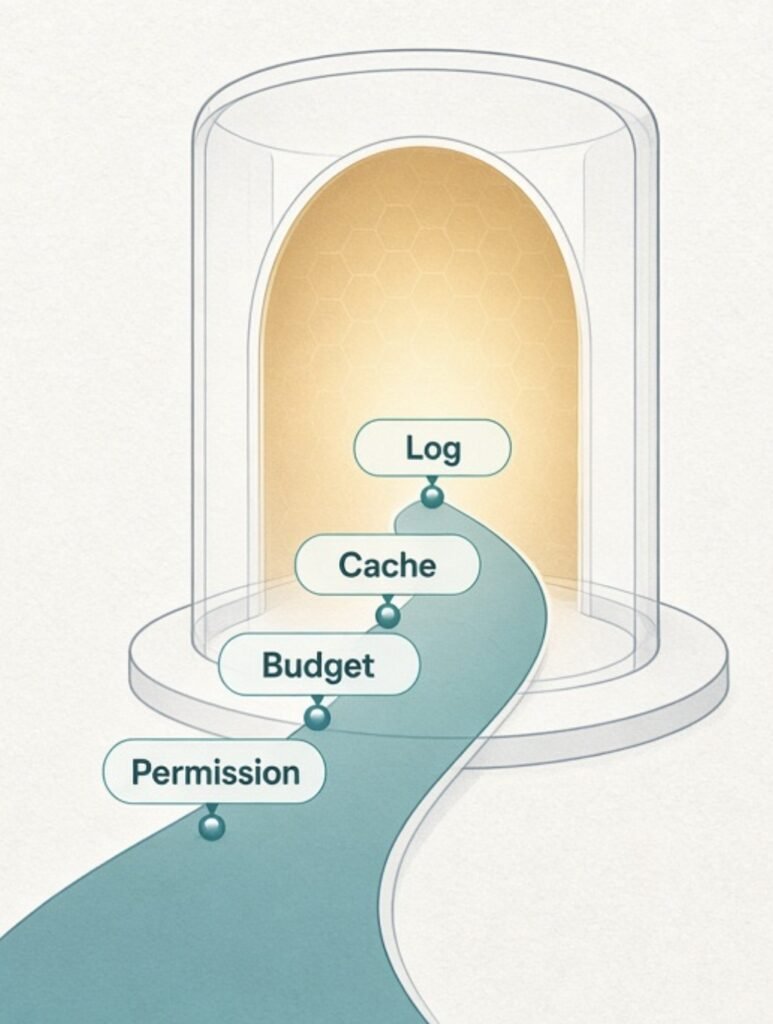
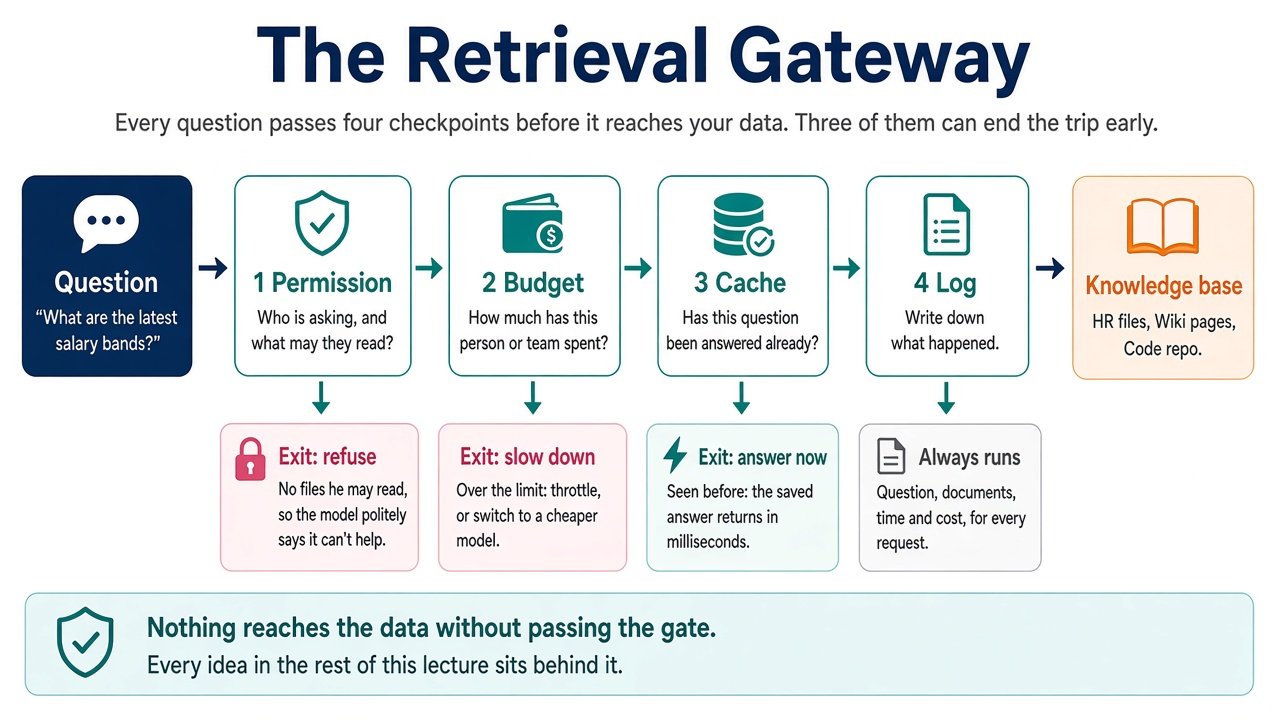
The Retrieval Gateway is a service layer between the application and the systems that store company information. Instead of allowing every assistant, chatbot, or AI agent to connect directly to a vector database, the gateway becomes the controlled entry point for every knowledge request.
It checks four things, in a fixed sequence:
Checkpoint
What it verifies
What happens next
1. Permission
Who is asking, and which information can they access?
Refuse requests outside the user’s access rights.
2. Budget
Is the user or team’s usage within its spending limits?
Continue, switch to a cheaper model or throttle.
3. Cache
Is there a safe, reusable answer for this permission scope?
Return a valid cached answer or continue to retrieval.
4. Log
What happened during the request?
Record the outcome, including refusals and cache hits.
If the request passes the permission and budget checks but has no suitable cache entry, the gateway allows retrieval and generation to proceed. Logging runs on every path, including requests that are refused, throttled or answered from cache.
This architecture builds on the same principle discussed in Wronit’s enterprise RAG security guide: access restrictions must remain effective across retrieval, generation, citations, caches, logs and conversation history.
Why the order of the four checks matters
The gateway is not simply a collection of security features. Its sequence is part of the security design. Putting the right controls in the wrong order can still expose information or waste resources.
1. Permission must come before cache
Imagine a department head asks for a summary of confidential performance reviews. The assistant generates an answer and stores it in a shared cache. Later, a junior employee asks a similar question.
If the system checks the cache before checking permissions, it could return an answer created for someone with broader access.
The solution is to authenticate the requester and resolve their effective permissions before any cache lookup. Cache entries must also be separated by permission scope, but that is an additional safeguard—not a replacement for authorization.
2. Permission must come before budget
An unauthorized request should be refused before the system spends resources processing it.
There is little value in generating embeddings, searching documents or calling a language model for a request the user should never have been allowed to make. Check access first, then apply the appropriate usage policy.
3. Budget controls must run before expensive processing
RAG requests can involve embedding generation, vector search, reranking, external API calls and model generation. Those operations can add up when usage grows across departments.
A spending limit applied after generation does not prevent the cost from occurring. The gateway should evaluate the request’s budget before it starts expensive retrieval and generation work.
4. Logging must happen on every path
A successful answer is only one possible outcome. An enterprise system must also record refusals, throttles, cache hits, timeouts and retrieval failures.
If logs capture only successful responses, security teams may miss repeated unauthorized attempts, while engineering teams lose evidence about where requests are failing.
The logging step should therefore run regardless of how the request ends.
How to implement each Retrieval Gateway checkpoint
Permission: make access rights part of the retrieval process
Enterprise RAG permissions should be enforced by the application and retrieval layer—not left to the language model.
Start by identifying the access rules attached to each source. A support ticket may belong to a customer account, a wiki page may belong to a department, and a code repository may be restricted to a particular engineering team.
During ingestion, preserve the relevant access-control metadata with each document or chunk. Depending on the source, this could include:
Customer or account ownership
Department or business-unit access
Document-level access-control lists
Repository and team permissions
Confidentiality classifications
Source identifiers and document versions
At query time, authenticate the employee through the organisation’s identity provider. Resolve their current access rights and apply those restrictions to the retrieval query before documents are ranked or passed to the model.
Consider the original support-ticket example. The representative is authorised to view tickets for Acme Logistics. A ticket belonging to another customer must not become a retrieval candidate simply because the customer names look similar.
The assistant should return only authorised information. If no relevant records are available within the user’s permissions, it should say so rather than attempting to fill the gap with restricted content.
There is another important detail: permissions change. Employees move between departments, contractors leave, and customer assignments are updated. The gateway must account for permission changes and avoid relying on stale access metadata.
For a deeper look at enterprise controls, see Wronit’s guide to AI governance and compliance.
Budget: treat GenAI spending as an operational policy
Enterprise AI usage can grow quietly. A small internal assistant may begin with a handful of employees and eventually support hundreds of people, automated workflows and background agents.
Without request-level controls, the organisation may discover its actual usage costs only after the bill arrives.
The gateway should track usage by:
Individual user
Team or department
Business unit or cost centre
Application or AI agent
Model and request type
Track actual usage and estimated cost in dollars so technical teams and finance teams can work from the same figures.
A practical approach uses two thresholds:
Soft limit: When a user or team’s usage approaches its allocated budget, route eligible requests to a smaller or less expensive model. The assistant can continue operating, although response quality, latency or capabilities may differ.
Hard limit: When the spending threshold is reached, throttle or temporarily block additional expensive requests. This is particularly useful for runaway automation, repeated retries and agents caught in execution loops.
The system should also show teams their current usage. A visible budget encourages better decisions about which tasks genuinely need a powerful model and which can be handled with a simpler option.
Budget rules should be configurable. Different departments may have different limits, and model prices and business priorities can change over time.
Cache: make repeated answers faster without crossing permission boundaries
Enterprise employees ask many of the same questions every day:
How do I submit a travel expense?
What is the on-call escalation process?
Where can I find the latest security policy?
How do I request access to a software tool?
A well-designed RAG cache can avoid repeating retrieval and generation for questions that have already been answered. This can reduce response time and unnecessary model usage.
But a cache introduces its own security risks. A response is not safe to reuse merely because the new question looks similar to the original one.
Use three safeguards.
1. Include permission scope in the cache key.
Do not key an answer only by the question text. The key should account for the relevant user or permission scope, along with the application context. Two employees asking identical questions may not be entitled to identical answers.
2. Be careful with semantic cache matching.
These questions may look similar:
“What is our refund policy?”
“What is our refund policy for enterprise contracts?”
But the answers could differ substantially. Similarity thresholds should be conservative, and the system should consider the context and scope of the question before reusing a response.
3. Connect cache entries to source versions.
If an HR policy, customer contract or security document changes, an answer based on the previous version may become misleading. Track source identifiers and versions so that updates invalidate or refresh affected cache entries.
A cache should improve performance, not weaken access control or serve outdated business information.
Log: maintain an audit trail of what the assistant actually did
An enterprise AI assistant needs more than a conversation history. It needs a reliable record of how each request was handled.
For every request, capture the information necessary to investigate the result:
Log field
Why it matters
Request ID
Connects events across the application and services.
User or agent identity
Identifies who initiated the request.
Permission decision
Records whether access was allowed or refused.
Source document IDs and versions
Shows which authorised material supported the answer.
Cache outcome
Identifies whether the answer was reused or freshly generated.
Model and configuration
Helps investigate changes in behaviour.
Outcome
Records answered, refused, throttled, failed or cached.
Latency and estimated cost
Supports operational and financial monitoring.
Logs must be protected as carefully as the underlying business data. Employee questions, retrieved document references and tool results can expose sensitive information.
Avoid storing entire prompts and retrieved documents by default when a smaller set of diagnostic fields is sufficient. Apply access controls, retention periods and appropriate redaction to the logging system itself.
These records can also help teams identify recurring problems: documents that are frequently refused, outdated knowledge sources, repeated cache misses, expensive request patterns and access-control failures.
For organisations building wider AI workflows, Wronit’s data engineering services provide relevant context around data architecture, integration, governance and security.
A Tuesday morning: five requests through one gateway
To see how the sequence works in practice, consider a hypothetical mid-sized US software company using an internal RAG assistant.
Time
Request
Gateway decision
Result
9:02 AM
An engineering contractor asks for the payments service deployment configuration.
Permission check finds no access to that repository.
Refused and logged.
9:15 AM
A senior engineer asks for the same configuration.
Permission and budget checks pass; cache misses.
Retrieves authorised documents, generates an answer and stores it within the payments-team scope.
9:40 AM
Another payments engineer asks a similar question.
Permission and budget checks pass; a valid scoped cache entry exists.
Cached answer returned and logged.
9:55 AM
An automated QA agent enters a repeated request loop.
Team reaches its soft limit, then its hard limit.
Eligible requests are routed to a cheaper model; further requests are throttled.
10:01 AM
An HR generalist asks about the latest salary bands.
HR permissions allow access to the compensation folder.
Answer returned and logged.
Now imagine an engineer asks for the same salary information. The wording may be identical, but the permissions are not. The gateway refuses the request before the cache can return the HR answer.
Five requests, five different outcomes. The important point is that every outcome follows the same controlled route.
Common enterprise RAG security mistakes to avoid
Even a well-planned gateway can fail if applications are allowed to bypass it or if teams treat AI-specific risks as ordinary prompt-engineering problems.
Here are five mistakes worth checking before production deployment.
1. Asking the model to ignore restricted documents
A prompt such as “Do not reveal confidential information” is not an access-control mechanism. If restricted content has already entered the model’s context, the application has lost an important security boundary.
Enforce permissions before retrieval and validate the data passed to the model.
2. Leaving direct connections to the knowledge base
A gateway cannot protect information if another application, chatbot or agent can connect directly to the vector database.
Make the gateway the authorised route for knowledge retrieval. Review service accounts, API permissions and internal integrations to identify potential bypasses.
3. Treating AI agents as anonymous users
An autonomous agent should have its own identity, permissions and budget. It should not inherit unrestricted access simply because an employee or application started it.
For agents that interact with business systems, separate read permissions from action permissions and require appropriate approval for consequential operations. Wronit’s article on AI agent integration with ERP and CRM explores how controlled access and verified outcomes fit into enterprise workflows.
4. Hard-coding security and cost policies
Budget thresholds, model-routing rules, cache lifetimes, and retention periods will change. Keep these policies configurable and maintain a clear approval process for updates.
5. Testing only successful requests
A system that answers authorised questions correctly has not necessarily demonstrated that it can protect restricted information.
Test realistic user profiles, including contractors, new employees, department managers and administrators. Include similar customer names, revoked permissions, expired cache entries and requests for confidential records.
Wronit’s practical guide to LLM evaluations and AI safety discusses testing AI systems beyond whether their responses simply sound correct.
How to introduce a Retrieval Gateway without overengineering
You do not need to connect every company knowledge source before establishing a secure retrieval architecture.
Start with one department and one knowledge source. For example, a support team could pilot the gateway using its approved ticketing knowledge base.
A sensible implementation sequence looks like this:
Choose a limited use case. Identify the users, business questions and documents the assistant needs.
Map existing permissions. Understand how the source system identifies document owners, teams, customers and access rights.
Implement the permission check. Ensure unauthorised records are excluded before retrieval.
Introduce budget policies. Establish soft and hard limits for the pilot team.
Add permission-scoped caching. Test cache isolation and document-version invalidation.
Run negative tests. Attempt access with unauthorised accounts and deliberately similar customer or document names.
Expand gradually. Review real usage and security findings before connecting another department or knowledge source.
The team should also define who owns permission metadata, who approves policy changes, how incidents are investigated and how quickly access changes reach the retrieval system.
As the system grows, evaluate the agent’s runtime behaviour separately from the quality of its answers. Wronit’s open-source agent evaluations and observability guide explores how teams can inspect execution traces, evaluate outcomes and monitor production agents.
Enterprise RAG security checklist
Before moving an internal assistant into production, use this checklist to review the architecture with engineering, security, and business stakeholders.
A production-readiness review should also cover the AI application’s integrations, model providers, data locations and operational responsibilities. The right controls depend on the sensitivity of the information and the consequences of an incorrect or unauthorised answer.
FAQs
What makes enterprise RAG secure?
Enterprise RAG is secure when access permissions are enforced before retrieval and remain effective throughout the application. Each document or chunk should carry relevant access metadata, and each request should be filtered using the authenticated user’s permissions. Caching, conversation history, citations, and logs must follow the same security boundaries.
Can RAG caching expose confidential information between employees?
Yes. A cache that uses only question text as its key can return an answer generated for someone with broader access. Check permissions before cache lookup, scope cache entries to the relevant entitlements, and invalidate them when source documents or permissions change.
What should AI audit logs record in a RAG application?
Logs should capture the request ID, user or agent identity, permission decision, retrieved document identifiers and versions, cache outcome, model configuration, request status, latency, and estimated cost. They should also record why a request was refused or throttled. Protect these logs with appropriate access controls and retention policies.
Should AI agents have separate permissions from employees?
Yes. Agents should have identifiable service identities and permissions limited to their assigned tasks. They should not automatically receive all the access rights of the employee who initiated a workflow. High-impact actions may also require human approval.
Is prompt engineering enough to protect sensitive enterprise data?
No. Prompt instructions can guide model behaviour, but they cannot replace backend authorization. Sensitive information should be excluded from retrieval unless the requesting user or agent is authorised to access it.
Can an enterprise use open-source tools to build a secure RAG system?
Yes. Open-source components can support retrieval, evaluation, monitoring and observability. However, using open-source software does not automatically make an architecture secure. Organisations must still configure identity, access controls, data handling, integrations, deployment environments and audit policies appropriately.
Build an enterprise RAG architecture that earns trust
An internal AI assistant should never have broader access than the employee using it. Fast answers and relevant search results are valuable, but they are not enough when the underlying information includes customer records, financial details, employee data or confidential business documents.
The Retrieval Gateway provides a practical way to bring permissions, spending limits, caching and audit logging into one controlled request path. Start with a focused use case, test unauthorised access deliberately and expand only when the controls work as expected.
Planning a secure enterprise RAG implementation? Wronit Technocraft’s Generative AI team helps businesses design and build production-oriented AI and RAG solutions, with architecture decisions shaped around data access, integrations, governance and operational requirements. Explore Wronit’s Generative AI services to discuss a retrieval architecture suited to your enterprise environment.