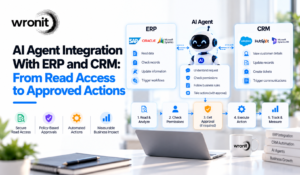
An AI agent connected to ERP and CRM systems should be treated as an operational system component, not just a conversational layer. The safest approach is to connect the agent through scoped, authenticated tools that enforce business rules outside the model, begin with read-only or proposal-only workflows, and introduce write actions only after identity, permissions, record matching, approval, duplicate prevention, concurrency, and recovery have been tested.
That distinction is becoming more important as enterprise software vendors push deeper into agentic AI. Gartner said in July 2026 that up to $234 billion in enterprise application software spending could be exposed to agentic AI by 2030, reflecting a broader shift toward agents completing work across business systems rather than simply helping users navigate software. Microsoft is making a similar architectural shift in Dynamics 365, where ERP and CRM applications are increasingly being positioned as systems that can support controlled AI-driven actions under existing permissions, security controls, and audit requirements.
 For buyers, this changes what “AI integration” should mean. An assistant that explains a customer record is useful, but an assistant that updates that record operates in a much more demanding environment. Another employee may change the same record after the agent reads it, an API may save successfully but time out before returning confirmation, a retry may create a duplicate action, or a seemingly simple update may require human approval.
A production-ready design therefore needs more than good model responses. It needs deterministic controls around the model, including authenticated identity, tenant and record-level access, narrowly defined tools, business-rule validation, approval tied to the exact proposed change, concurrency checks before writes, idempotency for safe retries, and verification against the ERP or CRM system of record after execution.
This is also why current enterprise AI strategies increasingly focus on governance, controlled execution, and operational reliability rather than model capability alone. For US and UAE organizations evaluating AI agent integration with ERP and CRM systems, these controls should be defined before implementation begins, not added only after an agent is already allowed to modify production records.
This guide explains how to structure those boundaries, move from read access to approved actions, and test whether an ERP or CRM AI agent is ready for production use.
For buyers, this changes what “AI integration” should mean. An assistant that explains a customer record is useful, but an assistant that updates that record operates in a much more demanding environment. Another employee may change the same record after the agent reads it, an API may save successfully but time out before returning confirmation, a retry may create a duplicate action, or a seemingly simple update may require human approval.
A production-ready design therefore needs more than good model responses. It needs deterministic controls around the model, including authenticated identity, tenant and record-level access, narrowly defined tools, business-rule validation, approval tied to the exact proposed change, concurrency checks before writes, idempotency for safe retries, and verification against the ERP or CRM system of record after execution.
This is also why current enterprise AI strategies increasingly focus on governance, controlled execution, and operational reliability rather than model capability alone. For US and UAE organizations evaluating AI agent integration with ERP and CRM systems, these controls should be defined before implementation begins, not added only after an agent is already allowed to modify production records.
This guide explains how to structure those boundaries, move from read access to approved actions, and test whether an ERP or CRM AI agent is ready for production use.
What does ERP and CRM integration actually involve?
The model is one component in a wider application. A typical integration needs identity handling, a connector or API client, trusted business logic, workflow state, monitoring, and a way to reconcile results with the source system.
Separate three levels of capability:
Level
|
Example
|
Required boundary
|
| Read |
Summarize permitted account activity |
Record and field-level access |
| Propose |
Prepare a follow-up task or record-change draft |
Validated fields and a clear review state |
| Act |
Create the approved task or update allowed fields |
Current authorization, policy checks and result verification |
Make the level explicit in the statement of work. A demonstration of reading a record does not establish that the supplier has solved controlled writes.
1. Define one workflow and its system of record
Start with a narrow task, such as preparing a customer follow-up after a service request. Identify which system owns the customer ID, which owns case status, and where the follow-up will be stored.
Do not allow a plausible company name to substitute for a confirmed record match. If several accounts match, the workflow should obtain another identifier or ask an authorized person to choose.
Document the mapping before implementation:
- Business entity and tenant.
- Stable record identifiers.
- Required and optional fields.
- Allowed status transitions.
- Source of truth for each value.
- Behavior when data is missing or contradictory.
This exercise often exposes an integration issue that better prompting cannot solve. Wronit’s Data Engineering services are relevant to discussing the data mapping and preparation behind an AI workflow.
A tool such as “create a follow-up task for this authorized account” is easier to govern than unrestricted database access.
The tool should accept a defined schema, validate the target, enforce field restrictions and reject operations outside scope. The backend should derive trusted tenant and authorization context from the session, not from whatever identifiers the model supplies.
For example, a proposed tool could accept an account reference, a task summary and a due date. It should not silently allow the same request to change the account owner, credit terms or banking information.
OWASP’s excessive-agency guidance connects risk to the breadth of functions, permissions and autonomy granted to an agent. Use that distinction when reviewing a connector: availability of a capability is not a reason to enable it. OWASP: Excessive agency
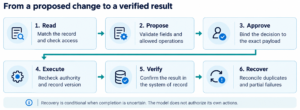
3. Bind approval to the exact proposed change
If a human must approve an action, show the actual target and fields. A vague request to “proceed” is weaker than a review of the specific change.
For the hypothetical follow-up workflow, the review should identify the account, task description, due date and intended destination. If the proposal changes after approval, obtain a new decision where required by the workflow’s policy.
Recheck authorization at execution time. An approval should not revive access that has since been revoked or authorize a different account with a similar name.
These are recommended application controls. They must be implemented in the workflow and backend rather than left to a model’s interpretation of an earlier conversation.
4. Handle stale records before writing
Imagine the agent reads a CRM record at 10:00. An employee edits it at 10:01. The agent attempts an update at 10:02 using its older view.
Where the platform supports it, use optimistic concurrency to detect the change. Microsoft Dataverse, for example, exposes ETags for conditional operations. An update can use the retrieved version so the service can reject a conflicting write rather than silently accepting stale assumptions. Microsoft: Conditional Web API operations
Check table support and the exact API behavior. When a conflict occurs, retrieve the current record, reassess the proposed action and renew approval if the material change requires it. Do not turn a conflict into an unlimited retry of the old payload.
The buyer’s acceptance test should deliberately edit the record between read and write, then observe the result.
5. Make retries safe for business operations
A timeout does not tell you whether an operation failed before saving or succeeded before the response was lost.
Suppose the system creates a task, but the caller does not receive the confirmation. Blindly repeating a create request can produce two tasks. For a more consequential operation, the duplicate can be much harder to repair.
An idempotency design associates the logical operation with a stable identifier and handles repeated requests without an additional unintended effect. AWS explains how explicit request identifiers and service-side handling support safe retries. AWS: Idempotent APIs
An identifier alone is not enough. The receiving system or integration layer must enforce the intended behavior, handle concurrent retries, retain the result for the needed period, and distinguish a repeated request from a new business action.
Where the backend has no suitable idempotency contract, design an alternative reconciliation process and document its limits. Avoid claiming exactly-once completion simply because a queue or agent framework is present.
6. Treat rate limits and partial failures as normal operating cases
Business APIs impose limits. For example, Dataverse can return HTTP 429 with a Retry-After instruction. A connector should respect that response and manage its workload rather than repeatedly resubmitting at the same rate. Microsoft: Service protection limits
Set bounded retries, timeouts and concurrency appropriate to the platform. Separate retryable technical failures from validation errors and authorization denials.
For workflows using a message queue, define what happens when processing cannot complete. Azure Service Bus provides dead-letter queues for undeliverable or unprocessed messages, but those messages still need inspection and an operational owner. Microsoft: Dead-letter queues
A recovery procedure should explain how to determine the last confirmed state, identify any completed writes and decide whether to resume, compensate or send the case for review. Some actions cannot be meaningfully undone; “rollback” should not be a blanket promise.
7. Verify the outcome in the system of record
After a successful tool call, retain the operation reference and relevant status. For important changes, read back the authoritative result or use the platform’s supported confirmation mechanism.
Do not make the customer’s success message depend solely on generated text. Distinguish “request accepted,” “processing,” “completed” and “needs attention.” A queued operation may be validly accepted without being finished.
Keep an audit trail sufficient to connect the user’s request, permission decision, approved payload, system operation and confirmed result. Limit sensitive content in logs according to the application’s retention and access requirements.
An integration acceptance checklist
Ask the supplier to demonstrate these cases in a suitable test environment:
Case
|
Expected evidence
|
| Two accounts have similar names |
Correct disambiguation before action |
| User requests an unauthorized record |
Backend rejects access |
| A record changes after it is read |
Conflict is detected and reassessed |
| Response is lost after a write |
Recovery avoids an unintended duplicate |
| API returns a rate limit |
Bounded, platform-appropriate backoff |
| Second system fails after the first succeeds |
Visible partial state and a recovery decision |
| Approval applies to an older payload |
Revised action cannot reuse it indiscriminately |
| Workflow restarts |
Confirmed work is distinguished from pending work |
For cross-border teams, add the actual business requirements: permitted processing locations, account isolation between legal entities, language handling and support coverage. The software design must reflect those requirements explicitly; a US or UAE address in the proposal does not establish them.
FAQs
Do we need to replace our ERP or CRM to add an AI agent?
Not necessarily. A scoped integration may use supported APIs, connectors or a controlled UI workflow. First assess the existing system’s interfaces, permissions and limitations. Replacement is a separate business decision and should not be assumed simply because an AI feature is requested.
Can a connector handle all the security for us?
A connector may handle part of authentication and transport, but the application still needs correct record scope, permitted actions and business-policy enforcement. Review the permissions it requests and demonstrate negative tests. A successful connection is not proof of a safe workflow.
What is a sensible first agent integration?
A read-only or proposal-only workflow with stable identifiers, a clear owner, and a verifiable outcome is a useful starting point. Introduce writes after the team has evidence for authorization, duplicate prevention, conflict handling and recovery in the same environment.
Prepare an integration brief
List the target workflow, systems, available APIs and actions you want to permit. Contact Wronit to discuss a scoped integration, and review its Generative AI services for the AI component of the requirement.
#AI Agent ERP and CRM#AI Agent Integration#AI Agent Integration With ERP and CRM